Stable
1.9.9774
Daily-driver build with the safest release cadence.
- Updated
- 14 weeks ago
- File Size
- 515.39 MB
- Release Notes
- Open notes
Stable is the recommended track for most users. Alpha gets you the newest capabilities first.
Daily-driver build with the safest release cadence.
Fastest release track with the newest features and experiments.
Every release stays linked here so you can inspect what changed before you switch versions.
Improved item removal UX and aligned it with other parts of the program

Changed how Enabling Conditions and References in BTs and Macros look like:
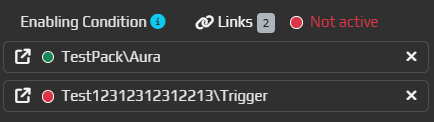
P.S. Note the icon to the left of the path - by clicking on it, you will be taken to that specific item.
C# Script node - when double clicked, code editor will be MaximizedLinks in them - when double clicked, you will be taken to the first link in the listLoginWidget not working properlyEvent LogFor years, Target Window was a prerequisite in all Capture triggers (Image/Color/Text/ML) - EyeAuras worked only with windows.
Starting from this version, we'll try a different approach:
Target Window is not set, EA will start capturing Primary ScreenTarget Window basically stopped Triggers from working. From now on, this will only switch the mode to Primary Screen capture and I would suggest to use Enabling Conditions to control the capture. This is very important! Check your old triggers to ensure that there are no "test" or "leftover" triggers as they will start eating up CPU.Target Window in many cases is not really required if you're playing games in Borderless Windowed or other similar modes where the game occupies the entire screenIMPORTANT! Multi-monitor setups are not supported yet. Only the primary screen will be captured. I'll extend support in the future

First steps toward offline mode - added new option in Settings which allows the client to function without connectivity to the server, even if the client gets restarted. For now, this is just a few hours, but as soon as I will be sure that the system properly works, this will be extended to days. This option will be removed in the future and will become default behavior of the client.

Added two new options in Packaging. Both of them are indended to be used by setups with custom scripts having their own UI. By leveraging Lifecycle Events trigger and C# script creating a custom Blazor Window, you can make it so YOUR user interface will be shown instead of EyeAuras.

If set, when the app gets fully loaded, main window will be minimized.
If set, the window won't even be displayed on the Taskbar, leaving only your custom window there.

Added two new examples which use BlazorWindows - Basic Window and Custom Login.
Login Widget allows to very easily integrate EyeAuras authentication into your app. It will get more customizable and extensible when I'll receive first feedback.

This trigger is designed to cover scripting scenarios such as running the script right when the app is opened. For now, there are only two events. We'll see whether some other events such as AppFocused could be useful.

In combination with other packing- and scripting-related features, I am targeting to streamline mini-app creation and make it possible to not bootup main EyeAuras UI at all. This is one of the steps.
Detailed information is available here
Использование NuGet-пакетов в скриптах открывает множество новых возможностей — их важность трудно переоценить.
Но загрузка и распаковка пакетов занимают время. Оно небольшое, но для конечного пользователя вполне заметное.
Теперь при скачивании любого Pack сервер EyeAuras будет анализировать ваш код и заранее загружать все необходимые пакеты.
Что это дает:
Это изменение НЕ имеет обратной силы — оно затронет только
newревизии pack.
In the changelog for the previous version I've mentioned that script compilation will be followed by script protection mechanism. It is extremely rough on edges still, so for a few weeks will be available only to very small group of people. Eventually this will become available for anyone.
Script Protection is part of Packaging options and is available only when you've set Compilation Mode to Binaries Only - it does not make much sense to apply it to binaries if you're distributing source code.
All you have to do is select desired mode, save options and upload your auras, just like you did before. Ideally, nothing should change for the end-user.
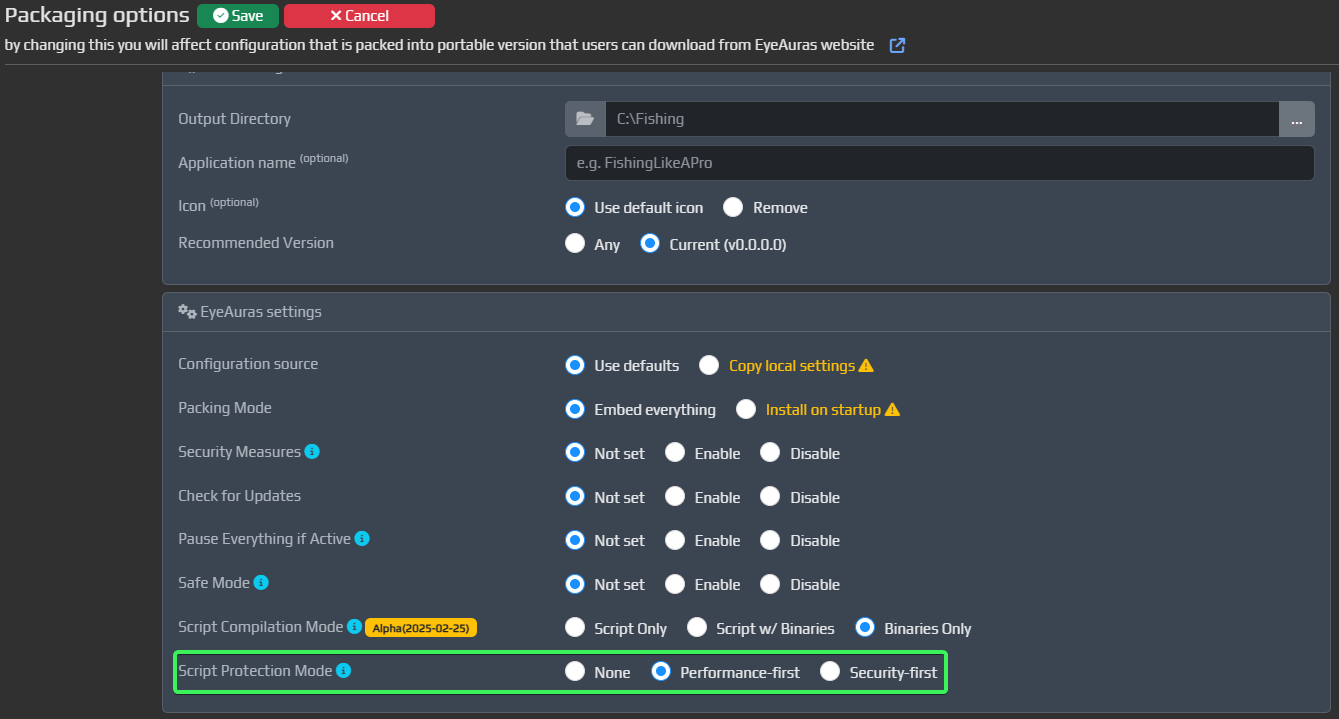
Please note, that infrastructure for this service is still extremely unstable and there could be problems spread everywhere - even if you have access to that feature, it may be worth giving it some time to cool down.
Major feature which opens up a lot of new possibilities. In short - from now on, when you're exporting new version of the pack(be it auction sniper or L2 helper or any other pack in the Library), you can make it so EA will pre-compile all the scripts which are part of that pack and include binaries into exported data.
Not only this saves up compilation costs for end-users, but it also makes it possible to exclude script code from exporeted project altogether!

IMPORTANT! To apply new compilation mode, first select desired mode, save settings and then
Uploadnew revision of the pack. For now, compilation is done on a client-side. Eventually, it will be shifted to server-side, like the rest of Packing configuration, but this is something for 2026.
I've covered this in depth here. TL;DR; Scripts - text version of your program. Binaries - compiled program. A lot of information gets lost (intentionally) during compilation, but for .NET it is still possible to recover most of the program if you know what you're doing.
For now, EA will include "pure" binaries, without any changes done to them. This is good from performance perspective and a step towards script protection, but for a person, who knows what he is doing, it is still possible to recover text of the program using tools called decompilers.
E.g. this is how decompiled code of one of PoE2 packs looks like - for a programmer this is like an open book.

The new switch, available on pack configuration page, allows you to select one of three available compilation modes. They all come with pros and cons.
This is the default one. Nothing changes from how it worked for years - when you're exporting something, all your script code gets exported with no strings attached and compiled on-demand on end-user PC.
Pros:
Cons:
Pros:
Cons:
Pros:
Cons:
More protective layers. As soon as current functionality will be stabilized, I will add another feature, which will allow you to automatically obfuscate your code. With a good obfuscator, it is immensely hard to restore the program to its initial ("pure") state.
For comparison, this is that same script which I've shown above, but obfuscated - as you can see, it is barely readable due to all tricks applied to the code. Restoring it to initial state, even having the binary, is a very complex task.


For you, EA users, this will be just an additional checkbox. For EA this will be a major new compilation pipeline involving a whole bunch of services and tools.
Eventually, there will be even more protective layers added on top of obfuscation, such as native compilation and virtualization. I will share more details later this year.
@Rowenor for finding this out!Details about both features were in this changelog. I've got the first feedback and done a few bugfixes/improvements in the mechanism - the most major is that the feature is now supported in Behavior Tree nodes as well.
Please keep in mind, that there may still be bugs and problems, I'll continue working on them in Q1-Q2. Eventually we'll get there.
Previously, when Enabling condition for the macro toggled back to Inactive state, EA interrupted Macro in the middle of whatever it was doing. This was intentionally implemented behavior which turned out to bring more problems than it solved.
For now, I've completely disabled any ways of prematurely stopping Macros - there will be tools which would allow to do that, which I will release in the nearest future (something like Exit and Break commands).
@Rowenor for finding this out!
Those scripts, which you write in EyeAuras, are actually full-blown C# programs, which have to be compiled to their intermediary form (CIL, intermediate language) before getting executed by .NET platform.
By default, scripts are stored in their source code form all the way up to their execution. Only when some action or node gets executed for the first time, the script gets compiled and then executed. This is how the system has worked for almost 3 years.

But. In many-many cases, this leads to noticeable delay for the first time when something gets called, be it some UI which gets drawn by the script or some C# action which presses a bunch of buttons - first call will always take much more time than all the rest. This is not a great UX and with two new features I'd like to solve that.
Important! Initially these changes will affect only C# Action, but eventually they will be spread to all other places where you can use scripting, such as BT nodes, Overlays, etc.
EyeAuras tries to optimize compilation process by storing everything needed for that process in-memory - this allows to reduce compilation time to tens and hundreds of milliseconds in most cases. Unfortunately, in some cases this may take much more time - some dependencies are too heavy to hold them in ready-to-use state, meaning they have to be loaded/unloaded on demand and this increases compilation time to 2-5 seconds, which is definitely noticeable by the user.
With the new option, whenever the program loads the script for the first time, it will automatically try to compile it. This will prevent that delay when the script gets actually executed.
When the code gets compiled, its binary form could be stored and re-used for subsequent launches. This may bring some problems to the table, such as the compiled code no longer being valid after some EA infrastructure changes, but in most cases, previously compiled code should be compatible. This option allows to make it so EA will try to store not only the source code of your script, but its binary form as well. Best-case scenario - after the program is reloaded, there will be no re-compilation, meaning zero delay for end-user.

One of the next improvements in that area will be wiring both of these into Packing mechanism. Ideally, when you'll publish the Pack, EA server will compile everything for you and will include only the binary version of your code into the final package (ofc optionally you will be able to include source code as well, just like it currently does). This should end up improving overall end-user experience.