Stable
1.9.9774
Daily-driver build with the safest release cadence.
- Updated
- 14 weeks ago
- File Size
- 515.39 MB
- Release Notes
- Open notes
Stable is the recommended track for most users. Alpha gets you the newest capabilities first.
Daily-driver build with the safest release cadence.
Fastest release track with the newest features and experiments.
Every release stays linked here so you can inspect what changed before you switch versions.
TargetWindow изменено выражение: теперь используется WindowHandle || ProcessName || WindowTitle вместо WindowHandle || WindowTitle || ProcessNameЧто же у нас нового?
Последние несколько месяцев работа в основном велась над C# скриптингом, там было множество изменений, в основном направленных на упрощение разработки и совместимость с разными NuGet-пакетами. Направление разработки постепенно смещается в сторону улучшения пользовательского опыта при работе со скриптами, хочется, чтобы было максимально просто и легко создавать новые мини-приложения, которые будут делать что-то полезное, будь то какая-то мелкая автоматизация или полноценный бот. Под капотом они будут использовать обширные возможности EyeAuras, ну а как это выглядит снаружи - это ВАШ выбор.
Для этого уже есть целый набор функционала, такой как:
Однако это еще не все - в этот список вскоре добавится и поддержка оплаты криптовалютами, и полное скрытие интерфейса EyeAuras, да и в целом многое, многое другое. Задача максимально сократить время, которое проходит от зарождения идеи до момента, когда у счастливых пользователей запущена ваше мини-приложение.
Я расчитываю, что именно мини-приложения смогут стать основным средством финансирования всех других разработок в EyeAuras(о них ниже). Время покажет насколько этот расчет верен.
Ничего плохого - да, ближайшие месяцы скорее всего будут потрачены на скрипты, однако в планах:
Вот эти подвисания при переключении между аурами уйдут наконец-то в закат. И загрузка ускорится примерно на 3-5 секунд. Переход займет примерно год.
У нас уже есть Ауры, Макросы, Деревья поведения и Скрипты. Все они хороши для решения каких-то отдельных задач: деревья для создания полноценных ботов, ауры для маленьких простых автоматизаций по типу авто-банок, макросы для автоматизации четко заданной последовательности действий. Ну а скрипты - универсальный молоток, для которого всё вокруг - гвозди. На этом этапе нет проблемы, которую было бы нельзя решить инструментами, которые уже имеются в наличии.
Однако! Всегда есть куда расти. Если вы знакомы с Unreal Engine, то наверняка уже поняли о чем речь. Есть желание совместить то, что уже реализовано в Аурах и Деревьях поведения и получить еще одно средство визуального программирования - Blueprints. Основная идея в том, чтобы позволить пользователям на одном полотне, схожем с тем, где вы сейчас строите Деревья поведения, размещать еще и Ауры. И настраивать реакции на срабатывания этих аур. И тогда у вас будет в одном месте собрано все-все-все, что нужно для построения логики. Одновременно у вас перед глазами и какие-то события, и последовательности действий, которые произойдут, и все стандартные вещи типа циклов. При этом никто не мешает вызывать и деревья поведения/макросы прямо из чертежей.
Эта разработка займет многие месяцы, однако первые наработки я думаю мы увидим уже в этом году.
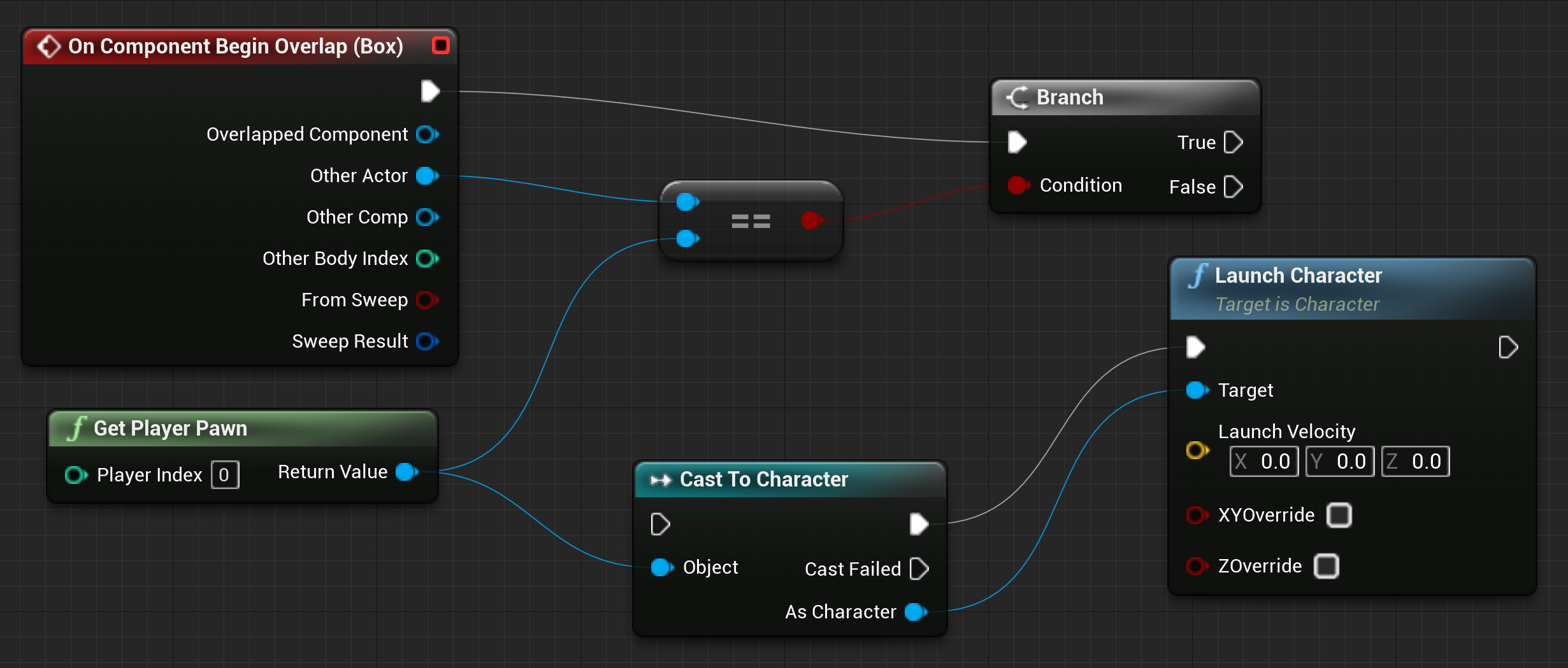
Это логическое продолжение идеи с мини-приложениями. Однако во главу ставится ваша программа, а EyeAuras превращается просто в здоровенный набор инструментов, которыми вы можете пользоваться. Хотите захватывать экран? Пожалуйста. Симулировать ввод одним из десятка методов? Тоже можно. А может быть хотите встроить только C# скрипты и дать возможность пользователям писать свой код? Проверенная годами инфраструктура скриптов к вашим услугам, они уже несколько лет служат верой и правдой. Абсолютно весь функционал, который присутствует в EyeAuras, без исключений, доступен в виде подключаемых модулей.
Все технические моменты уже решены и уже есть первые версии SDK, которые можно просто подключить к C# программе как NuGet пакет. Осталось решить вопросы с лицензированием и распространиением. SDK будет платным - вы единожды приобретаете его и дальше используете как хотите и сколько хотите, никакой завязки на инфраструктуру EyeAuras не будет, это полностью автономный продукт.
Постараюсь опубликовать все детали во второй половине года.
📎 Больше информации, примеры и скрипты — здесь
DMA (Direct Memory Access) — это технология, которая позволяет считывать или записывать данные напрямую в оперативную память компьютера, минуя CPU и операционную систему. Это делает возможным доступ к памяти любого процесса, даже если он защищён античитами и механизмами вроде Kernel Patch Protection (KPP), Hypervisor Protected Code Integrity (HVCI), User-mode hooks и т.д.
С DMA ты получаешь:
ReadProcessMemory, но за кулисами идёт работа с реальной шиной PCIe.
И всё это теперь доступно в привычном C#-скриптинге EyeAuras — без изучения HDL, PCIe, виртуализации или драйверов.IMemory и IProcess APIНачата работа над нативной интеграцией с ImGui — это альтернативный способ создания пользовательских интерфейсов в EyeAuras, дополняющий существующие Blazor-компоненты.
ImGui (или "Immediate Mode GUI") — это легковесная и быстрая UI-библиотека, изначально созданная для инструментов в игровых движках. Она используется в десятках AAA-игр и игровых редакторов благодаря своей простоте, минимальной инициализации и высокой отзывчивости. ImGui ориентирован не на декларативный подход, как WPF или HTML, а на "императивный" — UI пересоздаётся каждый кадр, что очень удобно для визуализации отладочной информации и каких-то простеньких интерфейсов.
Для EyeAuras это значит:
.csx-файле, где всё — и логика, и UI — содержится в одном месте.Вот пример(этот код разобран в гайде EN / RU):
AddNewExtension<ImGuiContainerExtensions>();

var osd = GetService<IImGuiExperimentalApi>()
    .AddTo(ExecutionAnchors);

osd.AddRenderer(() =>
{
    ImGui.Begin("My UI");

    ImGui.Text("Control window flags and interaction behavior.");

    var isActive = Trigger.TriggerValue ?? false;
    if (ImGui.Checkbox("Is Active", ref isActive))
    {
        Trigger.TriggerValue = isActive;
    }
    ImGui.SameLine();
    ImGui.TextDisabled("(Gets/Sets whether Trigger is active or not)");

    ImGui.Separator();

    if (Trigger.IsActive == true)
    {
        ImGui.TextColored(new Vector4(0f, 1f, 0f, 1f), "Trigger is currently ACTIVE");
    }
    else
    {
        ImGui.TextColored(new Vector4(1f, 0f, 0f, 1f), "Trigger is currently INACTIVE");
    }

    ImGui.End();
});
Этот подход отлично подойдёт тем, кто только начинает программировать, но уже хочет быстро создавать удобные интерфейсы для автоматизации. Немного шаблонного кода всё же нужно для старта, но дальше — всё становится интуитивно и предсказуемо. А ChatGPT может помочь с примерами, генерацией UI и логикой.
Теперь стало возможным создание мини-приложений, полностью реализованных в одном .csx-файле — всё, включая UI, действия, логику и даже отладочные элементы.

Usb2Kbd — это эмулятор аппаратного ввода, поддерживается в EyeAuras с примерно 2021 года.
Теперь вы можете собрать свой собственный примерно за 10$ — всё, что нужно, это небольшое устройство с AliExpress или Amazon.
Вот подробная пошаговая инструкция: на русском / на английском
Также была улучшена техническая часть и переработано окно настроек.

Теперь все action-узлы (Wait, MouseMove, KeyPress и др.) имеют Outputs.
Логика такая же, как у других узлов — связанный узел выполняется только если текущий завершился успешно.

Теперь можно задать Target Window и Input Simulator отдельно для каждого дерева/макроса. Вы все еще можете использовать настраивать их и на уровне папки, как это было раньше, это расширение, а не замена функционала

Теперь можно "ссылаться" из BT/Macro на другую ауру, содержащую C# Script действие — аналогично тому, как в программировании ссылаются на другой проект.
Все классы и типы из того скрипта становятся доступными для использования в BT.
Фича существовала давно, но была "спрятана", так как не была завершена и не работала так, как хотелось.

Теперь можно иметь C#-класс, который анализирует игру (через Computer Vision или чтение памяти) и передаёт данные BehaviorTree для принятия решения.
Вместо захламления дерева проверками и 50 переменными, можно иметь один класс, например TheGame, который будет оборачивать логику получения данных.
Больше информации доступно по ссылке
Проще будет показать на примере - предположим, вы создали новый компонент в скрипте.
@namespace GameGrind
@inherits BlazorReactiveComponent
<!-- ваш Razor/HTML код -->
namespace GameGrind;

public partial class UserComponent : BlazorReactiveComponent {
    // какой-то код
}
Обратите внимание на случайное пространство имён (GameGrind), которое раньше автоматически вставлялось при добавлении нового Razor-компонента.
Это небольшая, но крайне неудобная особенность: такой код было трудно перекинуть в другой скрипт EyeAuras — нужно было либо менять namespace, либо жить с разными несвязанными пространствами имён в коде.
Теперь это необязательно — можно опускать декларацию namespace как в .razor, так и в .cs файлах. EyeAuras автоматически вставит нужное пространство имён при компиляции. Меньше кода = меньше головной боли.
Исправлена проблема, при которой ComputerVision API не мог загружать модели/изображения по HTTP-ссылкам, и созданы два примера:
В этом примере показано, как:
ComputerVision, которую можно использовать для поиска изображений, ML, OCR и прочегоSendInput для эмуляции вводаOnScreenCanvas для рисования на экранеФактически, этих трёх инструментов достаточно, чтобы собрать полноценного бота :) Всё уже есть из коробки.

Почти то же самое, что и выше, но используется ImGui — очень мощная библиотека для рисования, с помощью которой можно создавать как полноценные UI, так и отрисовывать боксы/текст/прочее прямо на экране.
.NET — это платформа, на которой построен EyeAuras. Влияет на всё: запуск, память, работа с данными.
.NET 8 выбран из-за новой системы управления памятью, которая по тестам превосходит все прошлые версии и которая пока находится в стадии тестирования внутри Microsoft, так что в самом современном .NET 10 ее все еще нет. EyeAuras всегда выбирал увеличенное потребление памяти для получения большей производительности, так что для нас быстрый механизм сбора памяти - не роскошь, а необходимость. В этой версии мы все еще используем СТАРЫЙ механизм, но как только будет понятно, что версия стабильна - мы включим новый. Это должно дать измеримые улучшения во всех местах программы.

Теперь он использует новый UI фреймворк - стал более быстрым и отзывчивым.
Старый редактор

Новый

Серьёзно переработан рендеринг макросов. Это незаметно для маленьких (меньше 50 нод) макросов, чем больше макрос - тем больше будет заметна разница. Это НЕ финальные изменения в этой части.
Выношу это в отдельный раздел, так как, вероятно, все пользователи EyeAuras хоть раз сталкивались с этой проблемой: изменяешь размер одной панели — и она начинает перекрывать другую. Самый частый случай — C# Action перекрывает Event Log.
Этот баг известен как проблема Airspace в WPF, и ему уже более 12 лет. Конкретно в UI-фреймворке Microsoft, который использует EyeAuras, он присутствует с июля 2020 ссылка

И вот, наконец, спустя годы ожидания, Microsoft это пофиксили. Ура! К сожалению, это как раз тот случай, когда проблему очень сложно исправить со стороны приложения, так что оставалось только ждать.

Этот фикс важен не только потому, что теперь UI стал удобнее при низких разрешениях экрана, но и потому, что он блокировал переход на новый UI для триггеров и действий. Раньше единственным вариантом было переписать всё сразу — все триггеры и действия — и только потом выкатывать. Представьте себе: месяцы написания кода, который никто не может использовать до релиза, а багов потом было бы море.
Теперь же я могу переписывать всё постепенно. Работа всё ещё займёт месяцы, но теперь она хотя бы реально выполнима.
PoeShared.Blazor.Controls теперь доступен в скриптах по умолчанию, именно там лежат ReactiveSection/ReactiveButtonReadManaged<T>, который медленнее, чем Read<T>, однако поддерживает аттрибут MarshalAsReadExports теперь возвращает читаемое имя вместе с тем, которое экспортируется, к примеру ?StaticClass@UGameEngine@@SAPAVUClass@@XZ -> public: static class UClass * __cdecl UGameEngine::StaticClass(void)Вынес это в отдельный раздел, потому что с этой проблемой наверняка сталкивался почти каждый пользователь EyeAuras: вы меняете размер одной панели, и она начинает накладываться на другую. Самый частый сценарий — когда C# Action наезжает на Event Log.
Это известный баг — WPF Airspace issue. О нём известно уже как минимум 12 лет. Конкретно в UI-фреймворке Microsoft, который использует EyeAuras, проблема существует с июля 2020: https://github.com/MicrosoftEdge/WebView2Feedback/issues/356
И вот теперь, наконец, после многих лет ожидания Microsoft это исправила. Ура. К сожалению, это была одна из тех проблем, которые очень сложно исправить на стороне самого приложения, поэтому мне оставалось только ждать.
Это исправление важно не только потому, что интерфейс стал удобнее на низких разрешениях. Оно ещё и убрало одно из самых серьёзных препятствий для переноса триггеров и экшенов на новый UI-фреймворк.
Раньше единственным рабочим вариантом было переписать ВСЕ триггеры и экшены сразу. По одному, постепенно, это делать было нельзя. Как вы понимаете, такой подход практически нереален: полный переписанный набор занял бы месяцы работы над кодом, которым никто не пользуется, а потом всё это пришлось бы выкатывать разом. Количество багов было бы огромным.
Теперь же я могу переписывать триггеры и экшены постепенно. Переделка всё равно займёт месяцы, но теперь это хотя бы реально сделать.
IMemory -> ReadExports теперь возвращает человекочитаемую версию экспорта вместе с исходным именем, например: ?StaticClass@UGameEngine@@SAPAVUClass@@XZ -> public: static class UClass * __cdecl UGameEngine::StaticClass(void)Fixed the problem with ComputerVision API not resolving models/images via HTTP links and created two examples:
In this one I am showing how to:
Realistically, these three combined are more than enough to create a bot :) All the tools are right there in the box.
Verrry similar to the one above, except for a fact that it uses ImGui - immensely powerful drawing library that could be to create UIs as well as draw boxes/text/etc right there on the screen.
Usb2Kbd is hardware input emulator. It has been supported by EyeAuras since ~2021.
Now you can create your own for approximately 5$ - the only thing that is needed is small device from AliExpress/Amazon.
Here is the detailed step-by-step guide (russian / english).
I've also improved technical part and reworked settings window for better user experience.
Started working on native integration with ImGui - this is alternative approach to script/UI creation in EyeAuras. This should be the simplest one for those who only recently started coding - yes, some boilerplate code is requires to get things started, but after that it is very easy to understand. And ChatGPT can greatly help you.
Finally, it is possible to create truly 1-script mini-apps that incapsulate both UI and automation logic.
ReadManaged<T> — он работает медленнее, чем Read<T>, но учитывает MarshalAs и managed-структурыEyeAuras использует LeechCore — отличную библиотеку, разработанную Ulf Frisk, — для интеграции с DMA-устройствами. По сути, LeechCore является фактическим стандартом, с которым совместимо большинство подобных устройств.
Сейчас эта интеграция все еще находится на стадии alpha. Если хотите помочь с тестированием или вам интересно что-то разрабатывать в этом направлении — напишите мне.
На практике разработка с использованием FPGA-платы ничем не отличается от работы через ReadProcessMemory: EyeAuras берет на себя всю сложность управления LC API, переподключения, обработку ошибок и остальное. Вам остается только писать код.
Подробнее об этом здесь
Теперь в качестве Enabling Conditions можно выбирать не все триггеры, а только их часть.
Да, это немного уменьшает гибкость системы — например, больше нельзя использовать триггеры анализа изображения. Но.
Зато система стала проще и понятнее, особенно для новых пользователей.
Enabling Conditions изначально задумывались как глобальные переключатели Вкл/Выкл. Если вам нужно более динамичное поведение, используйте деревья/макросы или ауры с триггерами внутри.
Я продолжаю постепенно перерабатывать существующие компоненты EA, чтобы они использовали возможности нового UI-фреймворка.
Новая версия редактора свойств папки не только загружается быстрее, но и стала более гибкой.
Старая версия:
Новая версия.
В первой итерации моей целью было просто добиться паритета по функциям с текущей реализацией.
Теперь можно задавать Target Window и Input Simulator отдельно для каждого дерева/макроса. При этом они по-прежнему учитывают обычную иерархию свойств.
Например, если вы зададите Target Window у папки, внутри которой находится дерево, оно унаследует это значение. Но при необходимости вы всё так же сможете переопределить его уже в настройках самого дерева.